112 posts with category “Tech”

FFmpeg Quality Comparison

Flash video is so great.

Anyway I used to use MediaCoder to convert to flash video, but when it gave me errors, and refused to tell me the specifics of those errors, I took it old school to the command prompt with FFmpeg (which MediaCoder uses anyway). This gives you a lot of useful info about the source file you’re encoding, such as audio sampling rate, frame rate, etc.

Wanting to find a balance between picture quality and streamability, I began encoding a short length of AVI video at different compression levels. FFmpeg calls this “qscale” (a way of representing variable bitrate qualities, much like LAME‘s -V parameter), and the lower the qscale value, the better the quality. The available qscale values range from 1 (highest quality) to 31 (lowest quality). Going worse than a 13 qscale produces unacceptably poor quality, so that’s as low as I went for the purposes of this test.

I encoded 3:14 minutes of an AVI, resizing it to 500Ã — 374 pixels, and encoding the audio at 96kbps and 44.1KHz, which sounds fine, and is a negligible part of the ultimate file size, so going lower wouldn’t be very beneficial. Plus I find that good audio can create the illusion that the whole thing is of higher quality. Poor audio just makes it sound like “web video.”

Here are the results, courtesy of Google Spreadsheets:
FFmpeg quality vs. filesize chart

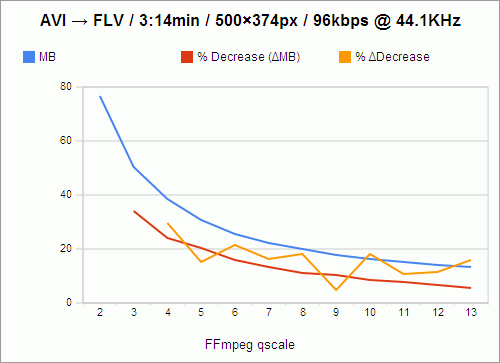
The filesize, of course, goes down as quality goes down. And the loss in filesize also decreases, not just in amount, but in percentage as well, as indicated by the red line. For instance, the value of the red line at qscale 3 is 33.97%, which means that in going from qscale 2 to qscale 3, 33.97% of the filesize is shaved off.

However, because these losses are not perfectly exponential, I knew that there had to be qscale values that were more “efficient,” in a sense, than others — values that, despite being high, and causing a lower change in filesize than the previous step in qscale, still caused a comparably large change in filesize. For instance, still looking at the red line, you’ll notice that going from 2 to 3, as I said, shaves off 33.97% of the filesize, while going from 3 to 4 only shaves off 23.93% of the filesize; and that is a 29.56% decrease in change-in-filesize, which is a relatively large cost. We want the change-in-filesize to remain as high as possible for as long as possible.

Now, if you follow the red line from 4 to 5, you’ll see that that’s a 20.32% loss in filesize, which is pretty close to our previous 23.93% loss in filesize in going from 3 to 4. In fact, we’ve only lost 15.09% of change-in-filesize from the previous step. So these are the values we really want to examine: change in change-in-filesize, represented by the orange line.

This is nowhere close to exponential, nor does it follow any predictable decline. It darts around, seemingly at random. And we want to catch it at its lowest values, at points that represent changes in qscale that were nearly as efficient as the previous change in qscale. So the most desirable qscale values become, quite obviously, 5, 9, and 11.

What this means is that if quality is your primary concern (and you’re not crazy enough to encode at qscale 1), go with 5. qscale 5 turns 3:14 minutes of video into 30.62MB, which requires a download rate of 157.84KB/s to stream smoothly. qscale 11 will give you about half the filesize, and require a download rate of 77.37KB/s. But, because that’s the level at which picture quality really begins to suffer, and because most people don’t really mind buffering for a few seconds initially, I’m probably going to stick with qscale 9, whose videos take up 91.58 kilobytes per second, and which is by far the most efficient qscale anyway, with only a 4.92% change in change-in-filesize.

One caveat: This whole examination presupposes (as far as I can tell) that if it were possible to measure and chart the changes in the actual perceived visual quality of videos encoded at these qscale values, the curve would be perfectly geometric or exponential, with no aberrations similar to those above, and with all extrapolated delta curves showing no aberrations either. Given that, it might be easier to believe that every step you take through the qscale is of equal relative cost, and that there are no “objectively preferable” qscale values. But that is a lot more boring.
25 Responses

Happy Birthday, Forum SpamBots!

In dealing with spambots as the administrator of a couple phpBB forums, I’ve noticed that most of them, when registering, give the birthdate of March 28, 1983. I thought there might be some explanation for this consistency — like the January 1, 1970 dating of phantom phpBB posts — but a Google search for “march 28 1983” only turns up threads on various forums mentioning the coincidence, without offering any explanation.
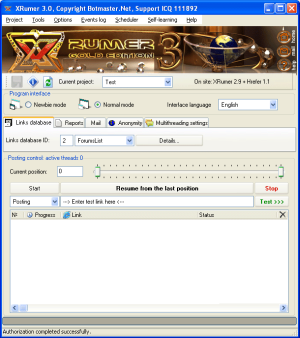
I did find out that these spambots are likely the product of XRumer, a spamming tool, so my guess is that March 28, 1983 is the default value of a configurable birthdate, but I’m not really interested in installing it to find out.

3 Responses

Prodigy

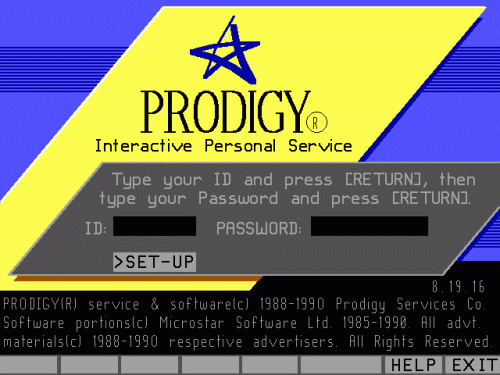
In the early Nineties my family had one computer, a Zeos 386, and Prodigy was my very first experience with anything resembling the internet, including e-mail. I spent a lot of online time playing this labyrinth game called Mad Maze, which you can once again play in its entirety, as long as you use Internet Explorer.

Mad Maze is being discussed at:

and on these blogs:

Leave a Comment

Vista Calculator

Vista calculator

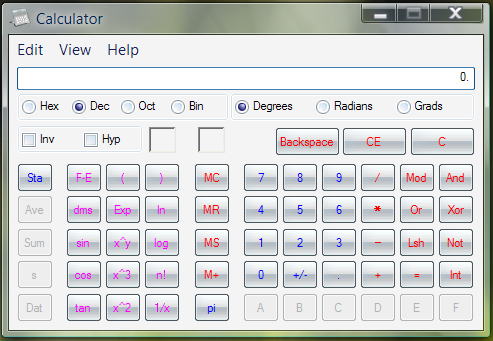
Believe it or not: still without a square root button in scientific mode.

I’ve also been told that the native Windows color palette still doesn’t save custom colors.

More Microsoft Calculator trivia, care of Wikipedia:

The version of Calculator shipped with Windows 3.0 and Windows 3.1 suffered from a bug causing it to display completely wrong results for certain classes of calculations. The most typical example was the 1-1.1 operation, which would lead to a long number sequence approximating the expected result, -0.1, such as -0.095645564564564…. One of the most joked about calculation is 3.11-3.1, results in 0.00. This leads to the joke “Q: What is the difference between 3.11 and 3.1? A: Nothing!” (In this case, “3.11” and “3.1” imply the version numbers of Windows.)

Oh, numbered Windows versions. Reminds me of those old PC Magazine issues I had with exclusive first looks at “Windows 4.0.”

Leave a Comment

Data Lust

I love Mozilla Thunderbird, not least of all because it’s a Mozilla-branded product, but also largely because of its adaptive junk mail filter. What this means is that for every email you get, you’re able to mark it as “junk” or as “not junk,” and from both of these practices, Thunderbird begins to learn (through Bayesian filtering) how to identify spam.

If you’re anything like me you’ve noticed that spammers are getting a lot craftier in recent months; I’ve even had a few spam emails slip into my Gmail inbox, when Gmail has in my experience been nothing short of astounding in its ability to identify spam. Which is to say, Thunderbird isn’t catching everything for me, at least not yet. I mark every spam I get as such, but the filtering relies on your marking the non-spam as well.

Anyway, it’s not hard work to mark all these emails (especially if you can highlight a bunch from a number of trusted senders and mark “not spam”), but it’s still work, and I’d hate to see it all go to waste if my hard drive crashed, or even if Thunderbird’s development suddenly halted — the data could prove useful elsewhere. And the idea of even having that data accessible to me outside of a practical implementation within a single program — in raw, browsable form — is really, really appealing.

Through very little Googling I found out that Thunderbird keeps all this training data in a single file, named, aptly, training.dat. It’s in your “Documents and Settings\Jay\Application Data\Thunderbird\Profiles\2e8vm8m0.default” folder. And apparently, simply putting it in another profile folder migrates all the training you’ve done to that other profile. Amazingly simple.

Here’s what the first ten lines of mine look like:

þíúÎ
justifies,
meaningful
sublicense
propelling direct
flyer-ing,
herbaliseratt
aggression
(surprise,
inflatable

I don’t get it either, and it just goes on like that, with no immediately recognizable structure or indication of what significance these words have, save for some seemingly random paragraph breaks.

BUT, when I Googled what I now knew to be the filename of the training data, I found that Mozilla created a little Java program called the Bayes Junk Tool, which makes this data surprisingly legible, AND exportable as XML, AND allows you to edit this data arbitrarily!! I couldn’t have asked for more.

Truthfully, I’m a little disappointed in the relatively rudimentary Bayesian approach. I thought for sure this training.dat file would be riddled with regular expressions, teaching Thunderbird that “v1agar” is the same thing as “\/|a gra.” Although that’s probably too subtle even for regular expressions. I can dream can’t I.

None of this is to undercut the invaluability of MozBackup, which keeps settings, cookies, extensions, cached files, and more within a single backup file.

3 Responses

Hotness 1.6.c.1

Totally warranted subversioning!

My foray into MP3Toys was ultimately short-lived, brought to a halt when I found what people were doing with Single Column Playlist for foobar, particularly the playlist-embedded album art. Back in the foobar saddle, I also gave in and tried out the “official” Play Count component, which I had avoided for so long because it didn’t support %FIRST_PLAYED%, and because I wasn’t sure I wanted my playback statistics only kept in the database — even though writing them to the files posed a lot of trouble as well. Turns out, playback statistics stored by the official component are less sensitive to changes to the files it’s keeping track of than the unofficial one, which means I only have to be a little careful to keep all my stats intact, while being able to play and track files that I’m still seeding.

This, along with the invaluable $cwb_datediff() function provided by Bowron’s new foo_cwb_hooks component, called for a rewrite to the hotness code, which had been stagnating in some marginally compatible 1.5 version since May. After severely trimming the code down and robusting things up, I thought of a new and totally non-arbitrary way to soften the blow hotness scores receive when songs are played. I hated seeing them leap to 100 every time, and this new softening method makes so much sense, utilizing existing baseline calibrations to keep things a lot more interesting. How anybody tolerated the old method is beyond me.

Anyway, here it is.

I also dug up a lot of old screenshots this week and I’m planning a nostalgia-fueled retrospective in the near future.

Leave a Comment

Weekly Top Album Art

Wow, I can’t believe I was able to do this.

http://www.kilobitspersecond.com/topalbumart.php?user=

Just tack your last.fm username onto the end of that url to generate the cover art for your most listened-to album of last week. Pretty cool.

Bands and albums with ampersands don’t work at the moment. urlencode() doesn’t seem to do the trick. Any theories?

One Response