Flash video is so great.
Anyway I used to use MediaCoder to convert to flash video, but when it gave me errors, and refused to tell me the specifics of those errors, I took it old school to the command prompt with FFmpeg (which MediaCoder uses anyway). This gives you a lot of useful info about the source file you’re encoding, such as audio sampling rate, frame rate, etc.
Wanting to find a balance between picture quality and streamability, I began encoding a short length of AVI video at different compression levels. FFmpeg calls this “qscale” (a way of representing variable bitrate qualities, much like LAME‘s -V parameter), and the lower the qscale value, the better the quality. The available qscale values range from 1 (highest quality) to 31 (lowest quality). Going worse than a 13 qscale produces unacceptably poor quality, so that’s as low as I went for the purposes of this test.
I encoded 3:14 minutes of an AVI, resizing it to 500Ã — 374 pixels, and encoding the audio at 96kbps and 44.1KHz, which sounds fine, and is a negligible part of the ultimate file size, so going lower wouldn’t be very beneficial. Plus I find that good audio can create the illusion that the whole thing is of higher quality. Poor audio just makes it sound like “web video.”
Here are the results, courtesy of Google Spreadsheets:
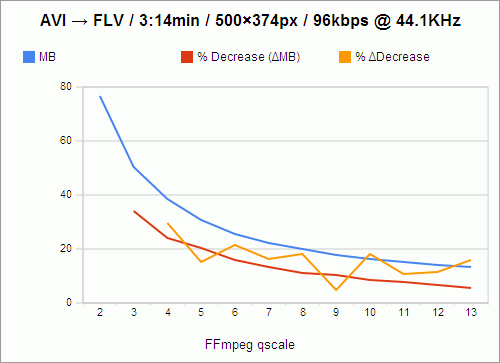
The filesize, of course, goes down as quality goes down. And the loss in filesize also decreases, not just in amount, but in percentage as well, as indicated by the red line. For instance, the value of the red line at qscale 3 is 33.97%, which means that in going from qscale 2 to qscale 3, 33.97% of the filesize is shaved off.
However, because these losses are not perfectly exponential, I knew that there had to be qscale values that were more “efficient,” in a sense, than others — values that, despite being high, and causing a lower change in filesize than the previous step in qscale, still caused a comparably large change in filesize. For instance, still looking at the red line, you’ll notice that going from 2 to 3, as I said, shaves off 33.97% of the filesize, while going from 3 to 4 only shaves off 23.93% of the filesize; and that is a 29.56% decrease in change-in-filesize, which is a relatively large cost. We want the change-in-filesize to remain as high as possible for as long as possible.
Now, if you follow the red line from 4 to 5, you’ll see that that’s a 20.32% loss in filesize, which is pretty close to our previous 23.93% loss in filesize in going from 3 to 4. In fact, we’ve only lost 15.09% of change-in-filesize from the previous step. So these are the values we really want to examine: change in change-in-filesize, represented by the orange line.
This is nowhere close to exponential, nor does it follow any predictable decline. It darts around, seemingly at random. And we want to catch it at its lowest values, at points that represent changes in qscale that were nearly as efficient as the previous change in qscale. So the most desirable qscale values become, quite obviously, 5, 9, and 11.
What this means is that if quality is your primary concern (and you’re not crazy enough to encode at qscale 1), go with 5. qscale 5 turns 3:14 minutes of video into 30.62MB, which requires a download rate of 157.84KB/s to stream smoothly. qscale 11 will give you about half the filesize, and require a download rate of 77.37KB/s. But, because that’s the level at which picture quality really begins to suffer, and because most people don’t really mind buffering for a few seconds initially, I’m probably going to stick with qscale 9, whose videos take up 91.58 kilobytes per second, and which is by far the most efficient qscale anyway, with only a 4.92% change in change-in-filesize.
One caveat: This whole examination presupposes (as far as I can tell) that if it were possible to measure and chart the changes in the actual perceived visual quality of videos encoded at these qscale values, the curve would be perfectly geometric or exponential, with no aberrations similar to those above, and with all extrapolated delta curves showing no aberrations either. Given that, it might be easier to believe that every step you take through the qscale is of equal relative cost, and that there are no “objectively preferable” qscale values. But that is a lot more boring.
Julius says:
Thanks for taking the time to do this, I was looking for exactly and just this information. Could you post the commandline in total that you’d be using for a -qscale 5 or 9 encode?
I’m also looking into doing VBR audio for flv with something like:
-acodec libmp3lame -aq 8 -ar 44100 -ac 2
Lame is actually doing much better at this variable rate (~99kbit/s) than any aac suitable for FLV1, even the nero one.
Jay says:
I ought to have done this for myself a long time ago anyway. Of course it depends on the file you’re encoding, but this tends to work:
Full FFmpeg documentation can be found here.
Kebvin says:
Thanks for this! Saved me a bunch of time doing it all on my own. I still want to investigate the effects of changing the picture size when using qscale to try and get the best quality when encoding dvd resolution videos. Will post here if I get around to it!
Fardeen says:
Thank u a lot for sharing those infos !
michaelrnz says:
Thanks very much for this information :)! It’s come in reaaaal handy today.
matt mcinvale says:
thanks! you just saved me a ton of research. :)
Weaver says:
Thank you very much. This nicely shows the influence of ffmpeg qscale parameter and it is very useful for ffmpeg newbie.
Daryl Lyn says:
I would like to see this simultaneous comparison including PSNR (peak signal to noise ratio) and SSIM (structural similarity index) on the same run of video. This would give you the quality comparison data, and then can easily create the change-in-PSNR and change in change-in-PSNR numbers. (and SSIM)
vikas says:
How can I rotate video using FFMPEG
Jay says:
@Daryl Lyn: Sorry man, that is way over my head.
@Vikas: I don’t think you can. Some Googling suggests that you can use mencoder for rotation.
Kyle says:
@Daryl: sounds like a great call-to-action. I’d be curious to see the results, too.
Jay: thanks for an excellent post. Is it possible these values have changed since you originally ran this, if ffmpeg has been upgraded since then?
Jay says:
Thanks Kyle. I’m sure it’s possible that the values have changed since I made this post. I’m not convinced my methodology was that great to begin with anyway.
Kastaldi says:
Idk if all these infos are still valid today,but seurely this post saves me a lot of headache :) thanks !
Rakesh Ron says:
The code u gave just saved me … thanks a lot :)
ffmpeg -i input.avi -f flv -qscale 5 -r 25 -ar 44100 -ab 96 -s 500×374 output.flv
Donald McLachlan says:
I’ve downloaded “Lupe (4k resolution).mp” from youtube. I’m using a script I’m transcoding from h264 to mpeg but varying the qscale from 1 to 31. The script is only at -qscale 10 now, but I got a bizarre step in the resulting filesize at -qscale 7. ie:
crc@crc-fsmanager:~/sageMedia> ls -lat *q*
-rw-r – r– 1 crc users 374580661 Dec 9 11:07 Lupe.4kq9.mp4
-rw-r – r– 1 crc users 389301775 Dec 9 11:02 Lupe.4kq8.mp4
-rw-r – r– 1 crc users 407061843 Dec 9 10:56 Lupe.4kq7.mp4
-rw-r – r– 1 crc users 276467924 Dec 9 10:50 Lupe.4kq6.mp4
-rw-r – r– 1 crc users 309350328 Dec 9 10:45 Lupe.4kq5.mp4
-rw-r – r– 1 crc users 362690494 Dec 9 10:40 Lupe.4kq4.mp4
-rw-r – r– 1 crc users 455177388 Dec 9 10:36 Lupe.4kq3.mp4
-rw-r – r– 1 crc users 663858946 Dec 9 10:31 Lupe.4kq2.mp4
-rw-r – r– 1 crc users 668366746 Dec 9 10:25 Lupe.4kq1.mp4
Any idea why the jump in filesize at -qscale 7?
Jeff Thompson says:
Thanks – fantastic resource! I’m trying to encode video with very hard edges (like graphic rectangles, etc) and don’t want the weird blurry-ness that seems to result. Running at -qscale 1 doesn’t seem to do a whole lot there. Anyone have some suggestions?
[CC] says:
I think your reasoning for your qscale choice is faulty. Take for example the transition from q=4 to q=5. For a (comparatively) small decrease in file size, you’re sacrificing a (however big) amout of picture quality. Think of it this way: If the orange graph was “near 0% at the transition from q=4 to q=5, what would you pick, the better quality q=4 or the worse one, q=5?
So bascially, what I’m trying to say it that your qscale pick is “one-off”, and this choice is “for the worse”. The correct choice in your case would be to pick 4 or 8 or 10.
If your “change in change-in-filesize” or 2nd-order derivative, whatever one prefers to call it, is approaching 0%, then what you get when transitioning from quality q (better) to (q+1) (worse) will net you near 0% of saved file size.
Gorge says:
To answer VIKAS question, to rotate your video use the filter
-vf transpose=1
There is 0, 1, 2, and 3 for different orientations of rotating and flipping. Thanks for this document.