112 posts with category “Tech”

LLMs are a resource, not a tool

Large language models — ChatGPT-like text-generating AIs — are unique in a way that makes it difficult to conceptualize what they’re doing. Strictly speaking, they’re predictive text generators, and nothing more. Their ability to recite facts is a side-effect of their having been trained on vast amounts of text that contains, among other things, those facts. They were not designed as “fact-retrieval engines.”

Nor were they designed as “software development engines,” despite their increasing use in this domain. Every tool or piece of software that uses LLMs for code generation feeds instructions to the LLM — invisibly to the user — that begin with the phrase: “You are an expert software engineer” (or something nearly identical to this).

With no more text to consume, and with fewer sources for their insatiable need for energy, LLMs are seeing the bulk of their improvements these days coming from the tools we’re building around them. This includes “prompt engineering” (knowing the secret grammar that will get them to do what you want), multi-agent workflows (LLMs using other LLMs, ad infinitum), etc.

LLMs’s proficiency with facts — yes, they screw up sometimes, and as such we shouldn’t rely on them for critical matters, but their fact-retrieval is astounding — has persuaded us that behind them is a general artificial intelligence, understanding our questions and rifling through its database of facts to give us answers.

As a result, first-time users of an LLM for code generation will often be perplexed at how poorly it understands their existing code, learning shortly thereafter that providing even a few bits of documentation dramatically improves the results — demonstrating just how helpless these things are for most tasks without our assistance.

Recently, Vercel, a cloud computing company, released an AGENTS.md file (a text file standard for coaching LLMs, written in plain English, with intermittent code examples) for writing code in React, a popular JavaScript framework for building complex web applications. This file is nearly 10,000 words, with an estimated reading time of half an hour.

If you take nothing else away from this blog post, remember this: for all the hype around AI, the state of the art in 2026 includes writing an entire book about React, and telling LLMs to read it before every interaction.


This has had me thinking about what an LLM is, exactly. What do we call something like this?

It may be easiest and most common to refer to it as a tool, but this isn’t quite right. A tool is designed, sometimes exquisitely, to achieve a specific purpose. LLMs aren’t that. Just about all their benefits to us are accidental.

Instead, a better metaphor might be to think of LLMs as a resource that we harness rather than a tool that we use. A resource in the sense that electricity, for instance, or the wind is a resource.

The wind is powerful and useful, but aimless and indifferent. We use the wind to power turbines, to fly kites, to sail. Sailing evolved and improved not because the wind got better at propelling our boats — it wasn’t designed to do that — but because we built better sails and developed better sailing techniques. And this is what we’re doing with LLMs today — building better sails, developing better techniques.

I’m reminded of Steve Jobs’ quip about Dropbox: that it’s a feature, not a product. I see echoes of this in Apple’s reluctance to turn Siri into a chat UI, perhaps because they’re seeing it in the same way.
Leave a Comment

The inconvenience of Kagi

I’m a big fan of Kagi. I’ve been paying for it for years. Any time I have to use a different search engine, it’s a frustrating experience.

Kagi just sent me three invitations for three free months of Kagi. I forwarded it to one friend who I thought might be interested. But when I tried to think of a second and third, I was at a loss for names.

For a moment, I imagined being any one of them, imagined how it must sound coming from me to suggest to them that they pay money for something that has been free their whole lives.

And then I pictured explaining to them that not only will they have to pay, but they will have to install browser extensions on any device on which they intend to use it. They’ll have to log in on all those devices, too. And I realized that would probably be more of an obstacle than the subscription fee.

Convenience can be a greater factor in a purchase decision than cost. For Kagi to be successful, it would have to be very nearly as easy to “set up” as Google. “Setting up” Google, of course, requires no effort, as it is the default search engine on the vast majority of browsers in use.

Asking someone to pay money for the privilege of managing and logging into a browser plugin — that’s a tall order.

Leave a Comment

LLMs make good analysts, bad oracles

I’m not an AI apologist by any means, but I’m frustrated by the muddled way LLMs have been marketed, portrayed, and used. I want to focus on the utility of them here, rather than the moral or legal implications of using copyrighted content to feed their corpora.

One of the first things we started doing when ChatGPT became public was, naturally, asking it questions. And for the most part, it gave us some pretty good answers.

But as has been widely demonstrated recently — as Google, Meta, and others have begun grafting “AI” onto their search results — is just how wrong it can get things, and it has had us asking: Is this really ready for widespread adoption? Asking for arbitrary bits of information from an LLM’s entire corpus of text — like Google’s and Bing’s smart summaries — is demonstrably, hilariously, and sometimes dangerously flawed.

Over the last couple years, I haven’t really heard much from OpenAI themselves about what we are supposed to be using ChatGPT for. They seem more interested in creating the technology — which no one could seriously doubt is impressive — than in finding real-world applications for it. The announcement for ChatGPT didn’t tell us what to do with it (though it did emphasize that the tool can be expected to product false information).

I think the misconception about what ChatGPT is purported to be good at can be attributed to the name and the UI. A chat-based interface to something called “ChatGPT” implies that the product is something it isn’t. It’s technically impressive, of course, and makes for a good demo. But chat doesn’t play to its strengths.

The reason any given LLM is even able to wager a guess at a general knowledge question is the corpus of text it’s been trained on. But producing answers to general knowledge questions is a side-effect of this training, not its purpose. It isn’t being fed an “encyclopedia module” that it classifies as facts about the world, followed by a “cookbook module” that it classifies as ways to prepare food. It was designed to produce believable language, not accurate language.

Where it does excel, however, is at coming to conclusions about narrow inputs. Things like Amazon’s review summaries; YouTube’s new grouping of comments by “topic”; or WordPress’s AI Feedback — these take specific streams of text and are tasked with returning feedback or summaries about them, and seem to work pretty well and have real utility.

These examples demonstrate two similar but distinct facets of LLMs: Their role as general knowledge engines, or “oracles,” and as input processing engines, or “analysts.” When we ask ChatGPT (or Google, or Meta) how many rocks we should eat per day, we are expecting it to behave as an oracle. When we ask it to summarize the plot of a short story or give us advice for improving our resume, we are expecting it behave as an analyst.

Signs point to Apple using LLMs primarily as analysts in the features to be announced at today’s WWDC, processing finite chunks of data into something else, rather than snatching arbitrary knowledge out of the LLM ether.

The allure of ChatGPT as an oracle is of course hard to resist. But I think if we recognize these two functions as separate, and focus on LLMs capabilities as analysts, we can wring some value out of them. (Their environmental impact notwithstanding.)

One Response

Apple TV+’s takeover of the Apple TV app Home Screen

Part of what used to be great about the Apple TV is that — unlike an Amazon Fire TV, for instance — Apple didn’t really have specific content it was trying to push on you. Sure, it might suggest that you rent or buy a movie from iTunes instead of from Amazon; and it would be safe to assume it might only recommend content that was available on iTunes, but practically that included everything.

Amazon, on the other hand, since they had gotten into the original content market, would be incentivized to give priority to their TV shows over others. Is my Amazon Fire TV recommending Sneaky Pete to me because it’s similar to stuff I watch, or because they stand to gain from it?

When Apple TV+ was announced, I worried that Apple’s having a stake in what specific content I watch would taint the Apple TV experience.

Boy, has it.

Below is a full view of the contents of the macOS TV app. The TV app on the Apple TV streaming box is roughly identical.

Continue reading

Leave a Comment

The Monetized Web

Nobody loves a paywall, but everybody loves Substack

Increasingly, it feels like paid memberships for web content are not only a viable alternative to surveillance-driven ad revenue, but one that readers are eager to embrace. The success of Substack demonstrates this. This success is often framed as a preference for reading in the inbox rather than on the web, which is some feat considering how much people have come to loathe email in general over the last couple decades.

But I don’t think it’s the inbox per se that people like; it’s that the inbox gives people what the web used to — and no longer does, but could — give them: an ad-free and distraction-free reading experience. Medium was supposed to do this, but has, perhaps predictably, caved and started showing upsell popups and “related content” sidebars all over its article pages to get your money and keep you on the site.

Patreon, like Substack, has seen a lot of success, but for whatever reason isn’t really thought of as a place for longform writing. Its content tends to be audio, video, art, and access to Discord communities.

Continue reading

One Response

Apple’s incomplete pronoun fields

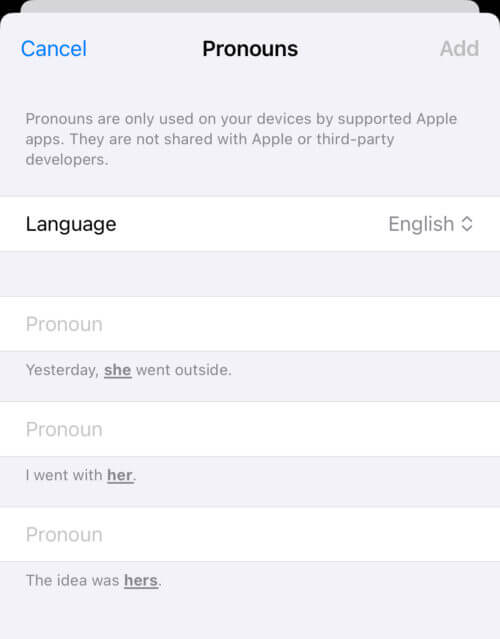
In iOS 17, you are now able to add pronouns to contacts, including your own contact card. This is a good thing, but at least one important pronoun case is missing from the “English” options.

The cases included are:

  1. Subjective (“Yesterday, she went outside.”)
  2. Objective (“I went with her.”)
  3. Possessive pronoun (“The idea was hers.”)

These three cases mirror the common “she/her/hers” structure used to communicate pronouns on social platforms like Twitter and Zoom; as such, they may seem complete, but they aren’t.

The missing case is the possessive adjective: “It was her idea.”

This may seem redundant, because in the declension of feminine pronouns, the possessive adjective is the same as the objective: “her.”

But in masculine pronouns, the possessive adjective is the same as the possessive pronoun: “his” (as in, “It was his idea”).

CaseFeminineMasculine
SubjectiveSheHe
ObjectiveHerHim
Possessive pronounHersHis
Possessive adjectiveHerHis

This isn’t a problem when interacting with people — we know how to decline the common feminine and masculine pronouns, so we know which form to use for the possessive adjective.

But because the iOS 17 UI doesn’t have a field for the possessive adjective, the OS and apps that have access to these fields — which have to behave programmatically — can’t know what to use for that case.

If I’m writing an app and I want the UI to say, “Would you like to call her?” in reference to some contact of yours, I can use the objective pronoun field. But if I want the UI to say “Her birthday is coming up” (the possessive adjective), I don’t have the necessary information.

I can try to guess, based on what I know about the declension of these common pronouns. But what about uncommon ones, like Ze or Xe? Anything I want to use will have to be hard-coded.

This is not even to mention the reflexive case — “She was proud of herself” — which is entirely absent.

Leave a Comment

Third-party gyroscopic head tracking is not “Spatial Audio”: the Anker soundcore Liberty 4

From a credulous 9to5Mac review of some new Anker earbuds:

Arriving with active noise cancellation, Anker also backs its Liberty 4 with Spatial Audio support, thanks to the internal gyroscope that helps immerse you in the sound.

From the description on the Amazon product page, titled “soundcore by Anker Liberty 4, Noise Cancelling Earbuds, True Wireless Earbuds with ACAA 3.0, Dual Dynamic Drivers for Hi-Res Premium Sound, Spatial Audio with Dual Modes, All-New Heart Rate Sensor”:

360° Immersive Spatial Audio: As you listen to music and watch movies, the built-in gyroscope and spatial audio algorithm track your head movements to always keep you at the heart of the sound for a completely immersive experience.

From the FAQ on Anker’s product website:

How do I enable Spatial Audio?

  1. Wear the earbuds.
  2. Enter the soundcore app and connect Liberty 4.
  3. Select Spatial Audio. 
  4. Spatial Audio cannot be turned on while sound effects are turned on. 
  5. Select Movie or Music mode to adjust the sense of distance while listening to different types of audio content.

Spatial Audio — the Apple feature — is an OS-level capability for taking true many-channel audio and “shaping” it to mimic the effect that the contours of your ears have on physical sound waves when they reach your head. Thus a sound in a movie that would be directed to the rear right speaker in a theater or surround sound system will sound like it is coming from behind and to the right of you when you are wearing compatible headphone hardware.

In other words, if you wear the Anker soundcore Liberty 4 earbuds, connect them to your iPhone, iPad, Mac, or Apple TV, and watch a movie that contains Dolby Atmos audio — you will not be hearing that movie in Spatial Audio. You will be hearing it in stereo, with the Liberty earbuds (on platforms where the app is available) shaping the waveforms so that they sound like they are originating from a space in front of you rather than the center of your head. No sounds will appear to come from behind you with this technology, as they can with true Spatial Audio.

Dynamic Head Tracking — the Apple feature — is a joining of hardware and software, whereby the source of your audio (your iPhone or iPad) is “aware” of its spatial relation to your headphones. Thus if you turn your head, the audio will continue to sound as though it’s coming from the device, rather than in the direction you’re facing; similarly, if you move the device around your head, the perceived locus of the audio will follow the device.

If you wear the Anker soundcore Liberty 4 earbuds and listen to music on your iPhone or iPad, even with the soundcore app, the experience is less clear to me. I believe that the app may ask permission to read your device’s motion sensors, giving it enough data to cause the audio to always follow the device, but I can’t be sure. In any case, this will not be the system-level Dynamic Head Tracking that is only possible with iOS 15+ and compatible Apple headphones.

It bears repeating that Spatial Audio and Dynamic Head Tracking are two separate things, but now it seems necessary to add that there is no Spatial Audio without Apple hardware, period.

There’s no technical reason that Apple couldn’t make this kind of third-party Spatial Audio compatibility possible, as far as I can tell, but as of yet, they haven’t done so.

Leave a Comment