13 posts with tag “software”

Alphabetization Is Not Fit for Music Libraries

Wikipedia’s article on alphabetization explains:

Advantages of sorted lists include:

  • one can easily find the first n elements (e.g. the 5 smallest countries) and the last n elements (e.g. the 3 largest countries)
  • one can easily find the elements in a given range (e.g. countries with an area between .. and .. square km)
  • one can easily search for an element, and conclude whether it is in the list
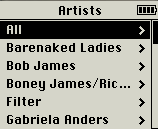
The first two advantages are things you almost never need to do with music libraries. And the third has been supplanted by now-ubiquitous search boxes: if you know what you’re looking for, you search; and if you don’t, an alphabetized list is not the way to find it.

Web visionary Ted Nelson (<mst3k>Dr. Ted Nelson?</mst3k>) has been paraphrased as pointing out that “electronic documents have been designed to mimic their paper antecedents,” and that “this is where everything went wrong: electronic documents could and should behave entirely differently from paper ones.” If the folder metaphor is inadequate for digital documents, no wonder it’s so pitiful at handling music. The proximity between pieces of music in a library should least of all be based on the first letter in a band’s name – it’s as arbitrary as sorting them by the vocalist’s month of birth – yet this is how it’s universally done.

Music library organization needs to be re-thought from the ground up. We need to consider how it is that people used to listen to music before it was all on their iTunes. How are your CDs organized (or disorganized) on your shelf? How are they organized in your head? What is it that prompts you to listen to what you listen to when you listen to it? And how can we use computers to adopt and enhance these ways of thinking, rather than forcing us to think like computers? Continue reading

17 Responses

foobar2000 Is Dead or Dying: Part 1

Originally written June 30, 2007.

There’s always been a significant faction of foobar2000 users whose primary attraction to the player is its appearance, or rather the level of control given to its users over its appearance. In its infancy, with the standard (and still default) UI, very little was possible — the main window consisted solely of a tabbed playlist and several functional toolbars — but people nevertheless took a lot of pride in making it their own, and some impressive things were done with relatively minimal flexibility. It was in the standard UI that users began experimenting with album-level presentation, choosing not to repeat redundantly the artist and album name on each line of the playlist, but to use the second, third, and sometimes fourth lines to display other info, such as year, label, genre, replaygain info, etc. Each of these customizations was unquestionably unique, but most of the broad details of the interface were consistent and inescapable.

The Columns UI component began as an experiment in allowing for multiple columns within the playlist display, emulating the Windows Explorer “Detail” view (and many other Windows programs), with sortability via clickable column headings. Eventually Columns UI added a sidebar and, later, panels, allowing the whole foobar window to be split up indefinitely into panel-based component displays, the playlist viewer becoming just another one of these. This granted much greater flexibility, allowing users to tailor the interface even more precisely to their needs. You could now display album art as prominently as you wanted, or not at all; your entire library tree could be embedded within the main window, rather than tucked away in a pop-up; and with the trackinfo panel’s exceptionally lax (by that era’s standards) stylizations, the personalization of your foobar became even more addictive, and, more importantly, rewarding.

Many seemed hell-bent on concocting the most garish presentations imaginable: giant gothic blue-on-black custom fonts, deep-red 200-px-tall spectrum analyzers, all, of course, coupled with custom OS “vis.”

While some still preferred the purity and elegance of the standard UI, the personalizations made possible by Columns UI were inarguably functional ones, for the most part. Fonts, colors, distribution of panels, and a rudimentary method of text alignment were really as far as you could go. At the core of all the boasted screenshots was a recognizable structure, all slight variations on the theme of playlist+trackinfo+albumlist+albumart. Outside of displaying album art, there was nothing profoundly new that Columns UI allowed you to do — rather, Columns UI gave you more control over how you did what you needed to do.

Continue reading

12 Responses

Windows XP SP3

Microsoft publicly released Windows XP Service Pack 3 yesterday, which means that it should appear in your list of available updates. To grab your own standalone copy of the update, download the EXE or the ISO directly from Microsoft. Lifehacker also has a tutorial on getting SP3 onto a Windows install disc to save yourself loads of trouble later. Read what Ars Technica, Lifehacker, and Wired have to say about the upgrade.

This service pack was rumored in November (by Wired and CNET, among others) to offer a 10% boost in speed, but who knows under what conditions it’ll actually be noticeable. And all this amidst protests against Microsoft’s plan to stop selling XP this summer. Even John Dvorak, whose columns I’ve been reading since adolescence, hates Vista:

You’re not supposed to deliver a new operating system that’s been in development for more than four years yet performs worse than the previous OS. Performance should be at the top, not the bottom, of the to-do list. You get the sense that Microsoft just piles code on top of code and somewhere in the middle of it all is MS-DOS 1.0.

I’ll say.

Leave a Comment

Songbird 0.5

Songbird 0.5 was released last week, and, while not technically inconsistent with claims that its RSS parsing had been “improved,” I was disappointed to see that two of my three podcast subscriptions still aren’t coming through. The problem has been migrated to a new bug ticket.

There’s also a new “Media Views” feature, which looks promising. As of now the only add-on to take advantage of this is a simple tag-cloud library view, but I imagine things could get really elaborate there. Their line, “Tired of music players that look like spreadsheets?”, has me anticipating all kinds of innovative browsing environments; picture a navigable mood-cluster terrain, or a pannable, zoomable, clickable history wavegraph. I’m seriously considering teaching myself enough XUL to be able to write a hotness add-on.

Amazingly, 0.1 was first released over two years ago. And their releases have code-names like Bowie and Eno? Who knew.

4 Responses