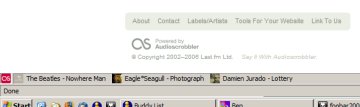
last.fm is great, and it gets better every single day. Part of its appeal is voyeurism. I love being able to see what my friends are listening to, but that usually requires going to the “What are my friends listening to?” page, which is still too much effort; I’m not that curious. But still, if somebody I know starts listening to something, I’d like to be alerted with a totally passive system.
There are, of course, RSS feeds for all kinds of things from last.fm. But there is no feed consisting of all your friends’ recent tracks, which is surprising because it’s such an intuitive idea. So implementing the ones that are available is ostensibly possible, but nevertheless tricky. I mean, logging into Bloglines or Google’s new reader still requires an active request for this information. And while there are some web services that will merge multiple feeds into a single one for you, I don’t like relying on a third party like that, one that may go down any day and that might insert advertisements into my feed.
It seems to me that there should be a very, very small program that sits in your system tray, checking multiple feeds regularly, then popping up a native Windows balloon with a link to the “article” every time there’s an update. This would be ideal for watching your last.fm friends. There are programs that do this, but they’re all full applications that only have this as an auxiliary feature. I can’t afford the memory.
So, finally, I found infoRSS. It’s a Firefox extension that adds a little ticker to the statusbar. Initially I wasn’t hopeful, as its default presentation is ugly and therefore indicative of poor programming:

The writer of this extension isn’t a native speaker of English, and there’s very little help available anyway. I spent a long time studying its many confusing features, confident that it could be made to do what I want. The result (shown at the top of this post) isn’t perfect, but is better than I had expected or hoped. There’s a nice little Audioscrobbler logo on the left; each entry is marked with the user’s avatar, which is far more efficient than if their name were displayed; and the listening status of everyone is constantly on display for me. Here’s how to do this:
Continue reading